Tuesday, 30 September 2014

Human Resource Management System - Using C# with Visual Studio 2008 (SQL Server 2005)

Development Tools:
- Microsoft Visual Studio 2008

- Microsoft SQL Server Management Studio 2005

                Features

The Proposed system has two main modules
  • Employee
  • Admin (HR)


Employee Module:

Employee Profile
Employees could view there profiles, checkout there salaries. 

Compensatory off
When an employee works on a holiday or works overtime on a working day, he/she can apply for a compensatory off.  The duration of comp-off will depend on the extra time worked by the employee and is subject to approval by supervisor.  The comp off time can be banked for a maximum of 30 days.

Leave Application
Based on the availability of leave,  employee can apply for leave online.  

View Leave Balance
Employee can view their eligibility and leave balance against each type of leave.  Details of the leave utilized in the current leave year can also be inquired upon.


Admin Module:
This module handles the administrative functions of the system and is used by the HR department.

Employee records
Admin can view and change the employee profile, also can add new recruits and remove former employee’s.

Performance Review
Admin can review employee’s performance and skills

Leave Eligibility
HR will enter the leave eligibility of each employee, for each type of leave, at the beginning of each leave year.  The leave eligibility will be calculated based on the annual entitlement and the carry forward from prior year.

Monthly Attendance
HR can generate a monthly attendance report of  all employees in the organization.

Daily Absent Report
Admin can view the total number of absentees of a particular department for a given day.  They can also inquire on the attendance history of an individual employee in a particular month.

Salary maintenance
Admin can calculate salary according to companies rules and regulations. They are even permitted to update employee salaries.
-----------------------------------------------
Code Perspective:
-  Object Oriented based
-  Queries using Stored Procedures

Download:
Filename:Human Resource Management System.rar
FileSize: 15.09MB
Package Contains: MS Visual Studio 2008 Project File and MS SQL Server 2005 Database


Mirror 1:              Click to Download
Mirror 2:              Click to Download

Friday, 22 August 2014

Free Plagiarism Detector - OS X Mavericks (Eclipse Java)

Main Concept:
The idea is to compare each characters and strings in a file pair to determine the similarity rate between them. Purpose of the application is to check for copied programming codes and essays. For codes we use keywords and identifiers in order to check if both have similar logistical structures and for the essays we just use the approach of finding many similar words are there between two files.

Features:

  • Supported Formats : .cs and .txt
  • Check Methods "For Essay" and "For Code".
  • Can upload multiple files from a folder easily.
  • Similar Position Highlights available.
  • Can check similarity between all the files pair by pair in-order to successfully judging cheated material.


Developed In:
-  OS X Mavericks
-  Eclipse 4.3 KEPLER (Java)
-  SWT The Standard Widget Toolkit for Graphical User Interface.
-  Java SE Runtime Environment 7 (JRE 1.7)


Download:
Filename:PlagiarismChecker.zip
FileSize: 183.12KB
Package Contains: Eclipse 4.3 Project file


Mirror 1:              Click to Download
Development Credits: Kamran Shahid, Fauzia Shahryar And Samina Zubair

Sunday, 17 August 2014

Story Crawler - Crawling RSS News Feeds And Maintaining a Database

Main Concept:
--> Crawling news (from the Internet).
--> Storing it into the database.
--> Retrieving information from the database to the application.

The application crawls the RSS feeds from the available sources. Stores all the gathered information in a Database. Then, we can retrieve the information on different views from the Database. Information flow is automatic and we do not control what gets in and out from the database as sources provides the input and our application views shows the output.


Features:
  • Crawling RSS feeds from predefined 15 sources 5 each (BBC, CNN, GoogleNews) and more sources can get added too.
  • Once news is synced, application works completely offline you can not only view the details about a story but also the full news story as it stores whole HTML webpages into the database.
  • Admin panel is available in-case you want to see how data is stored in the database or want to delete a news or clear the whole database.
  • SQL Wildcards are supported with search options; "SeachBy Title", "SearchBy Description", "Search in provided date range".
Setting it up:
  1. Download the package from the download section below.
  2. Attach the database to your MS SQL Server.
  3. Open project file and goto "App.config". Provide the correct connection string there or change the name "Dexter" to your SQL Server Instance name -> Save.
  4. Run application -> Click on "Update Resources" button (This will build sources in the database)
    - Requires 1 minute approx depending on your internet speed.
  5. Click on "Sync All" button (This will start crawling RSS feeds from the internet and retrieving and storing information to your database)
    - Requires 1-30 minute(s) approx depending on your internet speed.

You are Ready to go!!


Developed In:
-  MS Visual Studio 2010 (Using .Net Framework 4)
-  MS SQL Server 2008 R2 Service Pack 3

Download:
Filename:Story Crawler.rar
FileSize: 1.04MB
Package Contains: MS Visual Studio 2010 Project File and MS SQL Server 2008 Database


Mirror 1:              Click to Download

Friday, 1 August 2014

File Transfer Protocol - C# Socket Programming

Main Concept:
The idea is based on two applications:
  • The Server Application
  • The Client Application
Multiple Clients can access a server to upload to or download from the server. Server can Broadcast or Multicast files to its connected clients.The Server will also keep the records of transfers into it's database.

The Server and every individual Client is considered a Socket or an Endpoint. Server will interact with each client on a separate thread this way the information of one client will not get corrupted by any other.


Features:
  • Clients can upload files to the server and download hosted files from the server.
  • The Server uses threaded clients approach to interact with each client.
  • Server can Uni-cast, Multicast or Broadcast files.
  • Server maintains a database of file transfers. 

Developed In:
-  Visual Studio 2010 (using .net framework 3.5)
-  MS SQL Server 2008 R2

Download:
Filename:File Transfer Protocol DCN Project.rar
FileSize: 2.5MB
Package Contains: MS Visual Studio 2010 Project Files (FTP Client and FTP Server) and MS SQL Server 2005 Database


Mirror 1:              Click to Download

Development Credit: Kamran Shahid and Fauzia Shahryar 

Saturday, 26 July 2014

Spell Checker Application - Using C# with Visual Studio 2010

Main Concept:
Spell Checking is done by using Soundex Algorithm to find similar sounding words from the dictionary and then applying Levenstein-Distance Algorithm to get top ranked suggestions.

Features:

  • Back-end unique dictionary compiled from 22 different dictionaries (not available anywhere on the internet)
  • Sound Based Suggestions (Soundex Algorithm)
  • Distance Based Suggestions (Levenshtein Distance Algorithm)
  • All simple text processor features with Ignore, Add To Dictionary, Auto-Correct etc..
  • Can set number of suggestions to display.

Developed In:
-  MS Visual Studio 2010 (using .net framework 3.5)

Download:
Filename:SpellChecker.rar
FileSize: 4.22MB
Package Contains: MS Visual Studio 2010 Project File, Words Dictionary (.txt) and Executeable (.exe)


Mirror 1:              Click to Download

Friday, 25 July 2014

HTML Writer - Written in C# using Irony (Visual Studio 2012)

Main Concept:
Using Hand-Written Context-Free Grammer with some regular expressions in order to successfully parse hyper-text markup language on basic level.
Supported Tags: (With Attributes :: such-as width height href etc.. )
- FONT
- P
- H1, H2, H3, H4, H5, H6, H7

- A
- DIV


Features:

  • Parse and show HTML in a build-in browser if it is consist of the supported tags. 
  • Incase of incorrect syntax the application will detect and show the syntax errors with specific information like error line number, expected characters etc..
  • Tree View supported.
  • Parsing is totally based on Context-Free Grammer which you can view and change as per your needs in "HTMLGrammer" class.

Developed In:
-  MS Visual Studio 2012 (using .net framework 4.5)

Download:
Filename: HTMLWriter And Parser (Updated).rar
FileSize: 314kb
Package Contains: Visual Studio Project File and Executable (.exe)

Mirror 1:              Click to Download
Development Credits: Kamran Shahid and Abdul Haseeb

Saturday, 4 January 2014

Simple Download Speed Tester - Using C# with MS Visual Studio 2008

Objective:
To develop an application which will determine the Internet's download rate.

Concept:
To determine our download rate I just used some simple mathematics by noticing the start and end time of our test download then calculating download rate by converting time into kb/sec from seconds.

This application download GoogleTalk's setup file as a test from Google's web server because let's face it, neither I have/want my web server nor it would be as reliable a Google's. We know GoogleTalk's installer is around 1.5 MB in file-size so that we won't be downloading a file too small or too big but just good enough to get our download rate right.

Tools:

- MS Visual Studio 2008 ( .net framework 3.5 )

Compatibility:
Checked with
- MS Windows XP service pack 3
- MS Windows 7 service pack 1


Source Tutorial:
For a better concept and code understanding see this tutorial

Friday, 27 December 2013

DFA and PDA Programming Implementation - Using C# with MS Visual Studio 2008

Deterministic Finitie Automata Implementation:
A program that can read a DFA from a text file, and support the usual functionalities of a DFA (for the ease of programming i took initial state q0 as I, set of input Σ as S and define transitions using T instead of δ). Implemented a DFA with the 5-tuple (Q, S, T, I, F) and the DFA in a textfile looks like :
Q = {p, q, r, s}// Set of all states.
S= {a, b}// Set of input.
I = p // Initial State.
F = s // Final/acceptable state(s).
T(p, a)= q
T(p, b)= p
T(q, a)= r
T(q, b)= p
T(r, a)= s
T(r, b)= r
T(s, a)= s
T(s, b)= r

Download:
Filename: DFA Implementation C#.rar
FileSize: 256.72 KB
Package Contains: DFAProblem(Task), SampleInput file and Projectfile(VS 2008)


Mirror 1:              Click to Download    

PushDownAutomata Implementation:
A program that can read a simple form of PDA without lambda transition from the console or from a file or as a string within the program, and then support the usual functionalities of a PDA (for the ease of programming i took initial state q0 as I, set of input Σ as S, "stack symbols" as R, "lambda" as e and define transitions using T instead of δ). Implemented a PDA with the 7-tuple (Q, S, R, T, I, F) and the PDA in a text-file looks like :
Q = {p, q, r}
S= {a, b, c}
R= {a, b, $} //Set of stack symbols
I = p
F = s
T (p, a, e)= (p,a)
T (p, b, e)= (p,b)
T (p, c, e)= (q, e)
T (q, a, a)= (q, e)
T (q, b, b)= (q, e)
T (q, c, $)= (r, $)

Download:
Filename: PDA Implementation C#.rar
FileSize: 256.92 KB
Package Contains: PDAProblem(Task), SampleInput file and Projectfile(VS 2008)


Mirror 1:              Click to Download

Wednesday, 15 May 2013

Website Blocker - Using C# with Visual Studio 2010

Developed In:
-  Visual Studio 2010 (using .net framework 3.5)


Method:
Editing Host file located at C:\WINDOWS\system32\drivers\etc\hosts

Working:
Block Button:
Takes your text from Textbox and put it at the end of lines in host file like:
127.0.0.1        (your text eg. www.facebook.com)
*"127.0.0.1" is your Lan Card's IP and next to it is the "webaddress" you wanted to block access to.

UnBlock Button:
Takes your text from Textbox and search it at host file line by line. If found a line containing it then simply it will erase the whole line.

UnBlockAll Button:
Restore hosts file back to "default" by using hard-coded text in the code.

Compatibility:
-   Tested On MS Windows XP, MS Windows 7 and MS Windows 8.1
-   Requires (.net framework 3.5) in MS Windows XP

Download:
Filename: BlockIt.rar
FileSize: 122kb
Package Contains: Project (VS 2010) and Executable (.exe)


Mirror 1:              Click to Download

Saturday, 9 February 2013

Flexible Unbreakable Display Screens - Endless Posibilities - Samsung CES 2013

About four weeks ago, Samsung showed a radical 'bending' mobile phone at CES 13 in Las Vegas, which developed a feeling that the most anticipated next generation smartphone "Samsung Galaxy S4" could be a flexible OLED display smartphone.

Samsung is looking forward to the whole series of flexible displays, which will be known as Youm. Who knows that the next books will be of AMOLED instead of the papers. 

At CES 2013, Microsoft's chief technical strategy officer, Eric Rudder showed off a prototype device running windows Phone in a flexible AMOLED display.
 

Point to Ponder: If such displays are the future of the mobility then endless possibilities are waiting for us.

Tuesday, 18 September 2012

When and Where to Start Programming!

When to Start Programming?
You already are programming, i mean everyday your brain do programming to calculate the solutions for your daily life problems. 
for example: you are hungry ... your brain will calculate the possible solutions like
  • You can cook (If you don't have money)
  • You can eat at a restaurant (If you don't know how to cook)
  • Or ... You can Steal (If both of the above conditions are not suitable for you)
Yes, that's programming finding different solutions for a problem and go with the best one. and of course in Computer Programming you need to know the programming languages like C++, Visual Basic or Java etc to communicate with the Computer, as in real life you need knowledge and some skills to perform your daily task. If you can gain the required programming skills then your age doesn't count to start programming.
Where to Start Programming?

GW BASIC - is the best console programming language for beginners, it will give you basic concepts required in most programming languages out there.It's easiest to understand and best first step towards programming. You should spend 1 month (30 to 60 min each day practice) practicing GW BASIC.

VB.Net - It would not be as easy considering you only know GW Basic till now but it will probably change your perspective about programming. At the beginning you should be able to develop some accounting programs but as time goes on with good logical skills you can develop more effective applications like chat messenger, utility applications, and databases with Ms SQL or MS Access ...

After these two, you probably will able to choose next best and suitable programming language for you and your career. And of course don't forget C and JAVA.


Monday, 10 September 2012

How to Learn Hacking

I'm talking about "Ethical Computer Hacking" here not about some illegal stuff, to be a hacker you really need to define your goals because hackers don't just break securities, hack top secret military data or do any other cool stuff like in the movies but usually they find solutions with the help of their programming skills and intelligence.

Hacker's main role is to find vulnerable loop holes, in other words, programming mistakes which leaves private data insecure. You can learn hacking from the following websites but you need patience, intelligence and luck...


Good Luck!

Sunday, 19 August 2012

Keep you Computer Safe - from Viruses - without an Antivirus

I have Windows XP SP 3 and my operating system is virus free, it has been a year since I last installed a window. when it comes to security, MS windows does not provides you a better security then Linux and that's why Linux is more secure and that's why you purchase an Antivirus program to keep your computer safe.

In this world viruses spread in a light speed, and you always needed to update your antivirus so that it can protect your computer from any latest virus but the problem with having a antivirus is that, it gives you headache, slow your pc little bit, annoys you when you are working and requires updates in a week or two.

Things To Do:

  • Don't use pirated software because mostly they contain viruses, and it's illegal too.
  • Download software from publisher or developer you trust because a .exe or .bat could be a virus from unknown publishers.
  • Don't download attachments from unknown email and report that email, because people fall for spam.
  • Don't trust your facebook friends  (Any social media unknown or so called friends) and don't open what they send you unless you are fully sure that they can be trusted.
  • Do not run any picture, video file or any other media file which extension is ".exe" it could be like mypicture.jpg.exe ... in this the real extension is .exe, to enable extensions to be visible in your computer GOTO My Computer => Tools => Folder Options => View => Uncheck "Hide extensions for unknown file type"
  • Check file size before download, for example if you are downloading MS office 2010 which is of "12kb" of course it's a virus because this software is of "600MB +"
  • Download software from developer's official website, because you cannot take risk on any third party source.
  • Download USB Virus Scan to secure any virus possibility from USB Drives.

Wednesday, 15 August 2012

Stylish LED Watches - Cool World!

The technology of LED Watches is more then 40 years old, but what is something new is that now the LED Watches has got some style. I mean now they are coming with incredible designs, if you are not understanding my point just see some these new LED Watches.

TokyoFlash is one of the best seller of LED Watches,  Below are the images of some cool LED watches from TokyoFlash :- (Click to Enlarge)


Transparent Display - Laptops, TVs or in Mobile Devices!

The future we have seen in the movies is coming, as you can feel the technology around. One of the fastest evolving technology is of display screens :-

  • From CRT to LCD
  • From LCD to Plasma
  • From Plasma to LED
  • From LED to OLED
  • From OLED to AMOLED
  • From AMOLED to  AMOLED  (Transparent: In Progress)
Transparent Display Screens are coming, some companies including Samsung are working on it, but it has being couple of years but there is no authentic news of their success but as we know it's not that easy to make a screen completely transparent, even if you tell that to your grandfather, he will probably think that you are crazy, that's how crazy will be Transparent Screens.


  • Samsung is using these AMOLED screens in his high budget smartphones like Samsung Galaxy S2, S3 and Samsung Galaxy Nexus.
  • Nokia used it in Nokia Lumia 800, 900 and Nokia X7
  • HTC used it in HTC Legend and HTC One S.
None of these smartphones are smart enough for Transparent AMOLED Screens But their Display screens are incredibly thin. We can expect transparent screens in coming future. For now, Have a Good Day!

Transparent LCD is something new by Samsung you can checkitout:http://www.samsung.com/us/business/oem-solutions/lcdpanels/transparent-lcd-panels.html


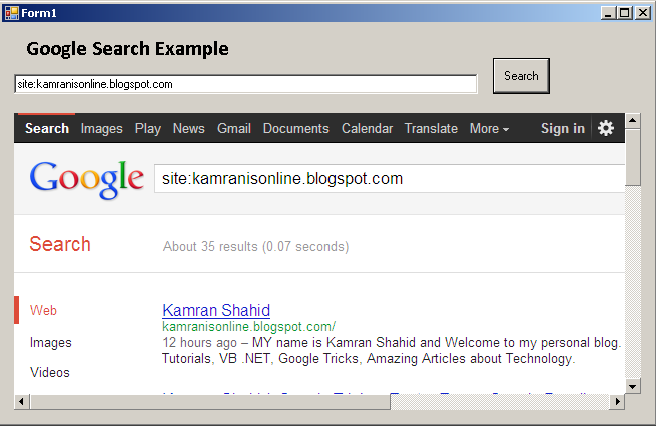
Add Google Search to VB .NET Program


  • Open Visual Studio 2005/2008/2010
  • Open New Project as Windows Form
  • Drag and Drop these controls from Toolbar => Common Controls
  1. TextBox
  2. WebBrowser
  3. Button (Set Text property to "Search")
  • Open Button1 for coding, then put the following code:
        Dim txtsearch As String
        txtsearch = TextBox1.Text
        txtsearch = "https://www.google.com.pk/search?q=" & txtsearch
        WebBrowser1.Navigate(txtsearch)
  • Run the Program, type any thing in a textbook and Click Search. The WebBrowser will Google search that Word or phrase.
  • Click on the Images below To Clearly see them.


For Any Queries, Comment On the Comment Section Below!!


Mini 8 GB to Small 500GB - USB Hard Drives

Who knows in future we maybe using USB Drives instead of Hard Drives, Why? because

  • Small Size with Huge Storage
  • Portability
  • Cool Looking
  • Upcoming Upgrades on USB Hard Drives
This is the Flash Drive that looks like Hard Drive, it is 8 GB USB 2.0 Flash Drive, It's looks are admirable
 It has this cool light strip to let you know that it's working. This is just a 8 GB flash so why i'm saying that maybe USD Drives will replace Hard Disk when Hard Disk can store far more data? 


Because 500 GB and even more Storage is now available.This is Verbatim's Store n Go 500GB USB 3.0 Portable Hard Drive.It is Faster and Portable. Here are some pictures of it.


How To Access Blocked Websites? - Easiest Trick

In Chrome:

Download this extension: https://chrome.google.com/webstore/detail/hide-my-ass-web-proxy/cmgnmcnlncejehjlnhaglpnoolgbflbd


In Firefox:

Download This Addon: https://addons.mozilla.org/en-us/firefox/addon/hide-my-ass-proxy-extension/


In Any Browser:


  • Goto http://hidemyass.com/
  • Replace http://google.com with desired url/website and click "Hide My Ass!" button
  • You are free ... freefalling!
  • Thanks Hidemyass.com and me and surf anonymously.

Tuesday, 14 August 2012

How To Prevent Hacking with a Strong Password? "boy" is more secure password then "Girl"?

What is a strong password?

Simply, a password that cannot be cracked or requires years to crack.

How to?

  • Don't use any common names like  "john", "canada", "football" in your password.
  • Don't use any common words like "small", "option", "father" in your password.
  • Of course, two points above exactly means that don't even use any word or name that is related to you like your pet's name, your aunt's nickname or your nickname.
  • Always use symbols in your password like "happ3n 9ing" (I included " " (a space) between n and 9)
  • You can check how secure is your password from here

Amazing:


"Girl" is more common password then "boy" and "you are sick" is more secure then "76y587yh" because it has 2 spaces (symbols).You can use other symbols too like <,*&*&(*$%& etc..